Table of Contents
- What Is Gmail Account Recovery?
- How Google’s Account Recovery System Works
- The Difference Between Gmail Password Recovery and Full Google Account Recovery
- Common Reasons You’ve Lost Access to Your Gmail Account
- What You Need Before Starting Gmail Account Recovery
- 5 Fast Gmail Account Recovery Methods (Step‑by‑Step)
- Method 1: Gmail Password Recovery via SMS – The Fastest Option
- Method 2: Recover Gmail Password Using a Backup Email Address
- Method 3: Google Account Recovery via Security Questions
- Method 4: Use the Google Account Recovery Form for Difficult Cases
- Method 5: Verify Identity Through a Trusted Device or Browser
- How to Recover Your Google Account Password Without a Phone Number or Email
- Tips to Improve Your Chances of a Successful Recovery
- How Long Does Gmail Account Recovery Take?
- What Happens If Google Denies Your Recovery Request
- Recovering Data and Emails from a Lost Gmail Account
- How to Secure Your Gmail Account After Successful Recovery
- Conclusion: Regain Control of Your Gmail — And Protect Your Data
- Frequently Asked Questions About Gmail and Google Account Recovery
- Frequently Asked Questions
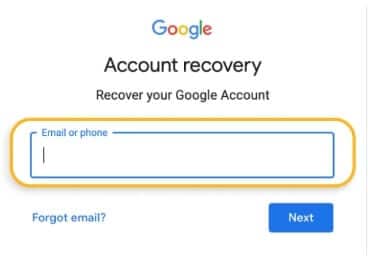
Gmail Account Recovery: The Complete Guide to Regaining Access to Your Google Account
What Is Gmail Account Recovery?
Gmail account recovery is Google’s built‑in process for helping users regain access to their accounts when they can’t sign in. It’s designed to verify your identity and restore access whether you’ve forgotten your password, lost your recovery phone, or your account has been compromised.
Users typically need Gmail account recovery when they’re locked out unexpectedly — often due to password issues, security changes, or suspicious activity.
How Google’s Account Recovery System Works
Google uses a dynamic identity‑verification system that adapts based on the information linked to your account. When you start the recovery process, Google evaluates:
- Your recovery phone number
- Your backup email address
- Previously used devices
- Familiar sign‑in locations
- Past passwords
- Account creation details
Based on these signals, Google presents the recovery options most likely to confirm you’re the legitimate owner.
The Difference Between Gmail Password Recovery and Full Google Account Recovery
Many users confuse password resets with full account recovery:
- Gmail Password Recovery: Used when you simply forgot your password. You still have access to your recovery phone or email, making the process quick.
- Full Google Account Recovery: Required when you’re locked out entirely — often due to hacking, lost recovery options, or account suspension. This process is more complex and may require manual review by Google.
Common Reasons You’ve Lost Access to Your Gmail Account
Understanding why you’re locked out helps you choose the right recovery method. The most common scenarios include:
Forgotten Password
This is the simplest and most common issue. If you still have access to your recovery phone or email, you can reset your password within minutes.
Lost Access to Recovery Phone or Email
If your recovery options are outdated or unavailable, Google must rely on alternative verification methods, making recovery more challenging.
Suspicious Activity or Account Hacking
Hackers often change passwords and recovery details to lock out the real owner. Acting quickly is essential to prevent permanent loss.
Account Disabled or Suspended by Google
Google may disable accounts due to policy violations, unusual activity, or security concerns. Recovery depends on the reason for suspension and whether Google allows appeals.
What You Need Before Starting Gmail Account Recovery
Gathering the right information increases your chances of success:
Recovery Phone Number and Backup Email Address
These are the fastest and most reliable verification methods. Ensure they’re up to date whenever you regain access.
Previously Used Devices and Locations
Google trusts familiar devices and networks. Attempt recovery from:
- Your home Wi‑Fi
- Your work computer
- A device you’ve used to sign in before
Account Creation Details and Past Passwords
Google may ask:
- When you created the account
- Old passwords you remember
- Security questions (if previously set)
Providing accurate answers helps Google confirm ownership.
5 Fast Gmail Account Recovery Methods (Step‑by‑Step)
Method 1: Gmail Password Recovery via SMS – The Fastest Option
- Go to accounts.google.com/signin
- Enter your Gmail address
- Click Forgot password
- Choose Send code to your phone
- Enter the SMS verification code
- Create a new password
This method works only if your phone number is still active.
Method 2: Recover Gmail Password Using a Backup Email Address
- Start the recovery process
- Select Send verification email
- Check your backup email inbox
- Click the recovery link or enter the code
- Reset your password
Method 3: Google Account Recovery via Security Questions
Security questions appear only for older accounts. If prompted:
- Answer as accurately as possible
- Use the same spelling or format you originally used
Even partial accuracy can help Google verify your identity.
Method 4: Use the Google Account Recovery Form for Difficult Cases
This is the best option when you’ve lost access to your phone and backup email.
Tips for completing the form:
- Use a familiar device and location
- Provide past passwords
- Enter the approximate account creation date
- Be consistent — repeated attempts with different answers reduce your chances
Method 5: Verify Identity Through a Trusted Device or Browser
If you’ve previously signed in on a device:
- Google may allow you to confirm your identity with a single tap
- This can bypass other verification steps entirely
How to Recover Your Google Account Password Without a Phone Number or Email
This is the hardest scenario, but not impossible.
Using the Google Account Recovery Page Without Verification Options
Visit accounts.google.com/signin/recovery and:
- Use a familiar device
- Provide past passwords
- Enter account creation details
- Answer any questions Google presents
Google evaluates your consistency and historical accuracy to determine ownership.
Tips to Improve Your Chances of a Successful Recovery
- Use your home or work network
- Try recovery from a device you’ve used before
- Provide accurate, consistent answers
- Avoid multiple attempts with different information
- Be patient — some cases require manual review
How Long Does Gmail Account Recovery Take?
Instant Recovery vs. Manual Review Timelines
- Instant recovery: SMS or backup email verification (seconds to minutes)
- Moderate recovery: Security questions or trusted device verification (minutes to hours)
- Manual review: Complex cases requiring Google’s intervention (24–72 hours or longer)
What Happens If Google Denies Your Recovery Request
A denial means Google couldn’t verify your identity. You can:
- Try again with more accurate information
- Attempt recovery from a familiar device
- Review any old passwords or account details you may have forgotten
If Google repeatedly denies your request, recovery may not be possible.
Recovering Data and Emails from a Lost Gmail Account
Can You Export Gmail Data Before Losing Access?
Yes — Google Takeout allows you to export emails, contacts, and Drive files.
However, you must set this up before losing access.
Professional Data Recovery Options for Critical Email Loss
For businesses or individuals who lose access to essential emails, professional data recovery services may help retrieve locally stored email data (e.g., Outlook PST files, cached mail, or backups).
How to Secure Your Gmail Account After Successful Recovery
Enable Two‑Factor Authentication (2FA)
2FA adds a powerful layer of protection.
Enable it via: Google Account → Security → 2‑Step Verification
Update Your Recovery Phone Number and Backup Email
Immediately update your recovery details to prevent future lockouts.
Review Account Activity and Remove Suspicious Access
Check Security → Your devices to:
- Identify unknown devices
- Sign out remotely
- Revoke app access
Use a Password Manager to Prevent Future Lockouts
A password manager helps you:
- Store strong, unique passwords
- Avoid forgotten credentials
- Reduce the risk of hacking
Conclusion: Regain Control of Your Gmail — And Protect Your Data
Losing access to your Gmail account can be stressful, especially when important emails or business‑critical data are at risk. Google’s recovery tools are powerful, but they’re not foolproof — especially if recovery details are outdated or the account has been compromised.
Only Google can help you recover your Gmail account
If you’ve lost access to essential emails or if your local PST/OST files are damaged, Disk Doctors can help you recover what matters most.
Need Professional Help Recovering Email Data?
Disk Doctors provides:
- Expert PST/OST recovery
- Corrupted mailbox repair
- Secure, confidential data handling
- Fast turnaround for urgent cases
- Data Recovery from any non-working data storage devices, e.g hard drive repair
Frequently Asked Questions About Gmail and Google Account Recovery
Frequently Asked Questions
1. What is Gmail account recovery?
Gmail account recovery is Google’s process for helping users regain access to their accounts when they can’t sign in. It verifies your identity using recovery phone numbers, backup emails, past passwords, and familiar devices.
2. When do I need to use Gmail account recovery?
You’ll need it if you’ve forgotten your password, lost access to your recovery phone or email, your account was hacked, or Google has temporarily disabled your account.
3. How does Google’s account recovery system work?
Google evaluates your recovery details, previous sign‑in locations, devices, and historical account information. Based on these signals, it presents the most suitable verification options to confirm your identity
4. What’s the difference between Gmail password recovery and full Google account recovery?
Password recovery resets only your Gmail password. Full account recovery is required when you’re completely locked out — often due to hacking, lost recovery options, or account suspension — and involves deeper identity verification.
5. Why can’t I access my Gmail account?
Common reasons include forgotten passwords, outdated recovery details, suspicious activity, hacking attempts, or Google disabling the account due to policy violations.
6. What should I prepare before starting Gmail account recovery?
Have your recovery phone, backup email, past passwords, and details like when you created the account. Using a familiar device and network also improves your chances.
7. How do I recover my Gmail password using SMS?
Start the recovery process, choose the SMS option, enter the verification code sent to your phone, and reset your password. This is the fastest recovery method.
8. How do I recover my Gmail account using a backup email?
Google sends a verification link or code to your backup email. Once you confirm it, you can reset your password and regain access.
9. Does Google still use security questions for account recovery?
Only older accounts may see security questions. If they appear, answer them as accurately as possible using the original spelling and format.
10. What is the Google Account Recovery Form?
It’s a detailed form used when you can’t access your phone or backup email. You’ll provide past passwords, creation dates, and other historical details to prove ownership.
11. Can I recover my Gmail account without a phone number or backup email?
Yes, but it’s harder. You must use the Google Account Recovery page and rely on past passwords, familiar devices, and account history to verify your identity.
12. How long does Gmail account recovery take?
It can be instant with SMS or backup email verification. More complex cases may take several hours or days if Google requires manual review.
13. What happens if Google denies my recovery request?
You can try again using more accurate information, a familiar device, or a known network. If Google repeatedly denies access, recovery may not be possible.
14. Can I recover emails or data from a lost Gmail account?
If you previously exported your data using Google Takeout or synced emails to a local client like Outlook, you may still have access. Otherwise, recovery depends on regaining access to the account itself.
15. Can I export my Gmail data before losing access?
Yes. Google Takeout allows you to download your emails, contacts, and Drive files. It’s recommended to export data regularly for backup.
16. When should I consider professional data recovery services?
If you’ve lost access to critical business emails or locally stored email files (like PST/OST files), professional data recovery may help retrieve them.
17. What should I do after recovering my Gmail account?
Immediately secure your account by enabling 2FA, updating your recovery phone and email, reviewing recent activity, and removing suspicious devices.
18. How does two factor authentication (2FA) protect my Gmail account?
2FA adds a second verification step — such as a code sent to your phone — making it much harder for attackers to access your account even if they know your password.
19. Why should I update my recovery phone number and backup email?
Outdated recovery details are one of the main reasons users get permanently locked out. Keeping them current ensures fast and successful recovery.
20. Should I use a password manager for my Gmail account?
Yes. A password manager helps you create and store strong, unique passwords, reducing the risk of forgotten credentials and improving overall security.