Table of Contents
- Data Striping
- Data Mirroring
- Parity
- Improved System Availability
- Better Performance
- Increased Data Protection
- Scalability
- Speed
- Storage Efficiency
- Fault Tolerance
- Best RAID Setup for Home Users
- Best RAID Setup for Small Businesses
- Best RAID Setup for Enterprise Servers
- Multiple Drive Failures
- Controller Failure
- Firmware Corruption
- Accidental Deletion or Configuration Errors
- Frequently Asked Questions
RAID Levels Explained: Which RAID Configuration Is Right for You?
Choosing the right storage setup can be confusing, especially with multiple RAID options offering different levels of performance, protection, and storage efficiency. Understanding RAID levels properly helps businesses, IT professionals, and everyday users choose a configuration that matches their needs.
RAID technology is commonly used in servers, NAS devices, and business storage systems because it can improve performance and reduce downtime when a drive fails. However, not every RAID configuration provides the same level of protection. Some focus mainly on speed, while others prioritize redundancy and fault tolerance.
Selecting the wrong RAID level can lead to serious problems, including reduced performance, unexpected downtime, and complicated recovery situations.
In this guide, we’ll explain:
- What RAID storage is and how it works
- The differences between major RAID levels
- Which RAID configuration is suitable for different use cases
- Why RAID is not a replacement for backups
- What to do if your RAID system fails
What Is RAID Storage?
RAID stands for Redundant Array of Independent Disks. It is a storage technology that combines multiple physical drives into a single logical system.
The main purpose of RAID is to improve one or more of the following:
- Data availability
- Storage performance
- Fault tolerance
- System reliability
RAID is widely used in:
- Business servers
- Network Attached Storage (NAS) devices
- Databases
- Video production environments
- Enterprise storage systems
However, RAID does not guarantee complete protection against data loss.
A RAID system can still fail due to:
- Multiple drive failures
- Controller problems
- Firmware corruption
- Accidental deletion
- Malware attacks
- Power failures
This is why understanding different RAID Levels is important before choosing a configuration.
How RAID Arrays Work: Striping, Mirroring, and Parity
Most RAID configurations use one or more of three core techniques:
Data Striping
Striping divides data into smaller blocks and distributes them across multiple drives.
This improves performance because multiple drives can process information simultaneously.
RAID 0 is the most common example of striping.
The downside is that striping alone does not provide redundancy.
Data Mirroring
Mirroring creates an identical copy of data on another drive.
If one drive fails, another drive still contains the same information.
RAID 1 uses this approach.
Parity
Parity adds calculated information that allows data reconstruction if a drive fails.
RAID 5 and RAID 6 use parity-based protection.
This provides better storage efficiency compared to mirroring but requires more complex rebuild processes.
Key Benefits of Using RAID Configuration
RAID provides several advantages when correctly implemented.
Improved System Availability
A redundant RAID configuration can keep systems running even when one drive fails.
This is especially important for businesses that depend on continuous access to files and applications.
Better Performance
Some RAID levels improve read and write speeds by distributing workloads across multiple drives.
Increased Data Protection
Configurations like RAID 1, RAID 5, RAID 6, and RAID 10 provide different levels of fault tolerance.
Scalability
RAID allows organizations to expand storage capacity as their requirements grow.
Hardware RAID vs Software RAID
Before choosing a RAID level, it is also important to understand how RAID is implemented.
Hardware RAID
Hardware RAID uses a dedicated RAID controller to manage storage operations.
Advantages include:
- Better performance
- Reduced CPU workload
- Enterprise-level reliability
Hardware RAID is commonly used in:
- Business servers
- Data centers
- High-performance environments
Software RAID
Software RAID is managed by the operating system.
Advantages include:
- Lower cost
- Easier setup
- No dedicated controller required
Software RAID is often suitable for:
- Home labs
- Small businesses
- Personal storage systems
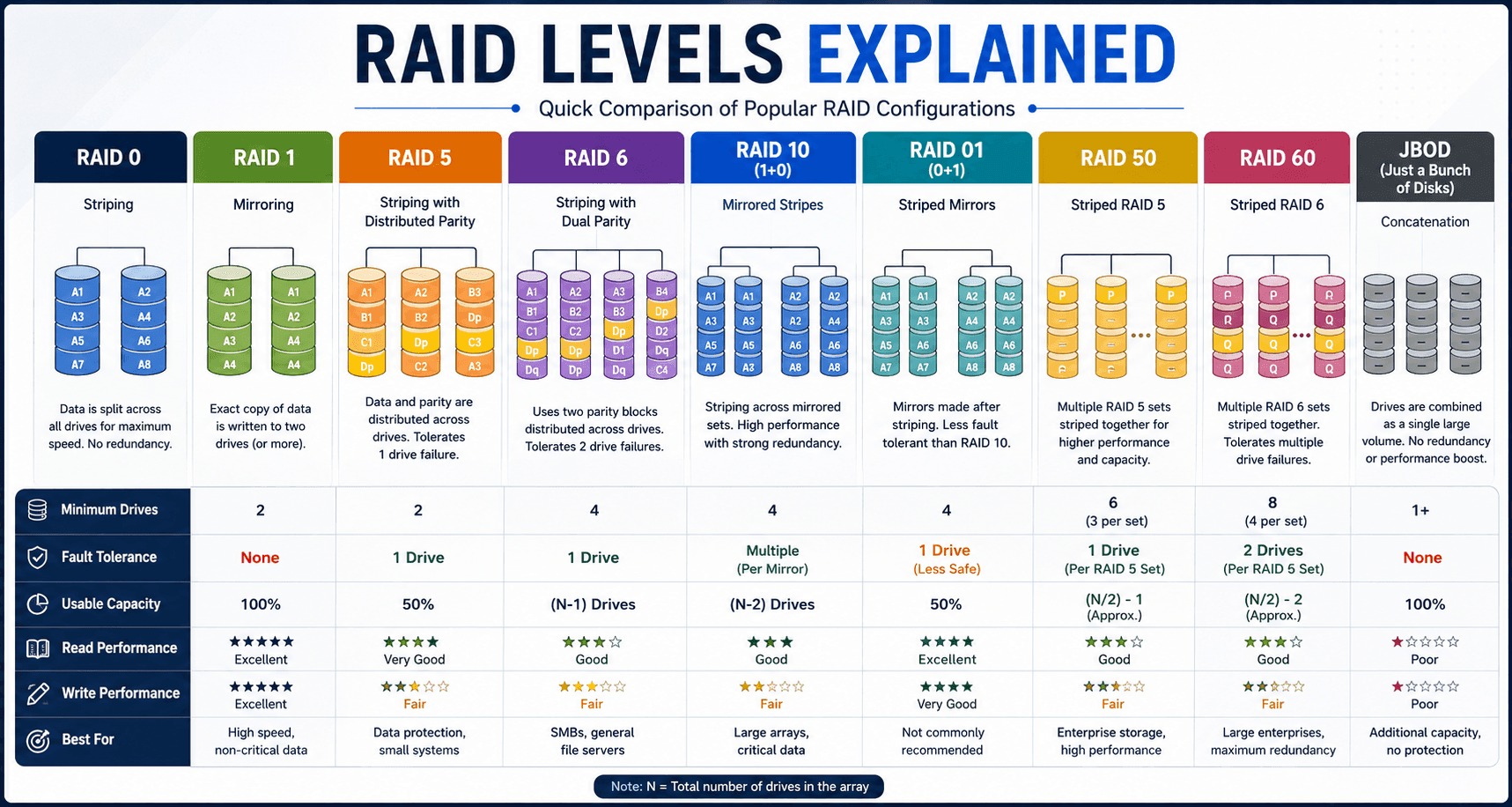
RAID Levels Explained: Understanding Every Major RAID Configuration
Different RAID levels are designed for different priorities.
Some focus on speed, while others focus on protection.
RAID 0: Maximum Speed Without Data Protection
RAID 0 uses striping to distribute data across multiple drives.
Because multiple disks work together, RAID 0 can deliver excellent performance.
Advantages:
- Fast read and write speeds
- Full storage capacity utilization
- Good for performance-heavy workloads
Disadvantages:
- No redundancy
- No protection against drive failure
- One failed drive can make the entire array inaccessible
RAID 0 is commonly used for:
- Video editing scratch storage
- Gaming systems
- Temporary project files
It should not be used for critical business data.
RAID 1: Drive Mirroring for Better Protection
RAID 1 creates an exact copy of data on two or more drives.
If one drive fails, another copy remains available.
Advantages:
- Strong fault tolerance
- Simple recovery process
- Reliable for important files
Disadvantages:
- Only 50% usable storage capacity
- Higher cost per usable GB
RAID 1 is commonly used for:
- Small business servers
- Important databases
- Operating system drives
RAID 5: Balanced Performance and Protection
RAID 5 combines striping with distributed parity.
It requires at least three drives and can survive one drive failure.
Advantages:
- Good storage efficiency
- Balanced performance
- Single-drive fault tolerance
Disadvantages:
- Longer rebuild times
- Higher risk during rebuild periods
RAID 5 remains popular among small and medium businesses.
RAID 6: Extra Protection With Dual Parity
RAID 6 improves on RAID 5 by storing additional parity information.
It can survive two simultaneous drive failures.
Advantages:
- Higher fault tolerance
- Better protection for large arrays
Disadvantages:
- Slower write performance
- Requires more drives
RAID 6 is often used in larger storage environments.
RAID 10: Speed and Redundancy Combined
RAID 10 combines RAID 1 mirroring with RAID 0 striping.
It provides:
- High performance
- Strong redundancy
- Faster rebuilds
RAID 10 is commonly used for:
- Databases
- Enterprise servers
- Applications requiring high availability
RAID Levels Comparison: Performance, Capacity, and Protection
When comparing RAID configurations, there are three major factors to consider:
Speed
RAID 0 generally provides the highest performance because it focuses entirely on speed.
RAID 10 also provides excellent performance because it combines striping and mirroring.
Storage Efficiency
RAID 0 offers maximum usable capacity.
RAID 1 sacrifices half the capacity for redundancy.
RAID 5 and RAID 6 provide a balance between usable storage and protection.
Fault Tolerance
RAID 0:
- No drive protection
RAID 1:
- One drive failure protection
RAID 5:
- One drive failure protection
RAID 6:
- Two drive failure protection
RAID 10:
- Multiple failure protection depending on drive arrangement
How to Choose the Right RAID Level for Your Needs
The best RAID configuration depends on your priorities.
Best RAID Setup for Home Users
Home users usually need:
- Affordable storage
- Basic protection
- Easy management
RAID 1 is often a practical choice for protecting important personal files.
Best RAID Setup for Small Businesses
Businesses should prioritize:
- Reliability
- Data availability
- Reduced downtime
RAID 1, RAID 5, or RAID 10 may be suitable depending on storage requirements.
For businesses storing customer records, financial files, and operational data, professional Data Recovery Services for Businesses can also provide additional protection when unexpected failures occur.
Best RAID Setup for Enterprise Servers
Enterprise environments often require:
- High performance
- Scalability
- Maximum uptime
RAID 10, RAID 6, and advanced enterprise RAID solutions are commonly used.
RAID Is Not a Backup
One of the biggest misunderstandings about RAID is believing it replaces backups.
It does not.
RAID protects against certain hardware failures, but it does not protect against:
- Ransomware
- Accidental deletion
- Fire
- Theft
- Human mistakes
A complete data protection strategy should include proper backups alongside RAID.
Common Causes of RAID Array Failure
Even the best RAID configuration can fail.
Common causes include:
Multiple Drive Failures
When multiple drives fail before rebuilding is complete, the array can become inaccessible.
Controller Failure
A damaged RAID controller can prevent access even when drives are healthy.
Firmware Corruption
Firmware issues can affect RAID operation and prevent systems from recognizing storage correctly.
Accidental Deletion or Configuration Errors
Incorrect changes can damage RAID structures and make data inaccessible.
What To Do When Your RAID Array Fails
If a RAID system fails:
Do not:
- Rebuild the array immediately
- Format drives
- Change drive order
- Install recovery software on original drives
Instead:
- Stop using the system
- Record error messages
- Avoid making changes
- Contact specialists
Complex failures often require professional RAID Recovery techniques to safely reconstruct the array and retrieve data.
Why Professional RAID Recovery Is Often Necessary
RAID recovery is more complicated than recovering data from a single drive.
Specialists may need to:
- Diagnose each disk
- Clone damaged drives
- Reconstruct RAID parameters
- Recover files from damaged structures
If individual drives have suffered physical problems, Hard Drive Recovery may also be required before the RAID system can be rebuilt.
Final Thoughts
Understanding RAID Levels helps you choose the right balance between performance, storage capacity, and protection.
RAID 0 delivers speed but no protection.
RAID 1 provides simple redundancy.
RAID 5, RAID 6, and RAID 10 offer different combinations of performance and fault tolerance.
However, no RAID configuration can completely eliminate the risk of data loss. Proper backups and a clear recovery plan remain essential.
Disk Doctors helps businesses and individuals recover critical data from failed RAID systems, damaged drives, and complex storage failures using professional recovery methods.
Frequently Asked Questions
Which RAID level is safest?
RAID 6 and RAID 10 generally provide stronger protection because they can handle multiple drive failures depending on configuration.
Is RAID the same as a backup?
No. RAID provides redundancy but does not replace a proper backup strategy.
Which RAID level is fastest?
RAID 0 usually provides the highest performance because it uses disk striping without redundancy.
Can data be recovered from a failed RAID system?
Yes, recovery may be possible depending on the RAID level, drive condition, and whether the system has been altered after failure.
What is the best RAID level for business use?
The best RAID level depends on workload, budget, and protection requirements. RAID 10, RAID 5, and RAID 6 are commonly used in business environments.