Macintosh Data Recovery - Recovers Mac Data
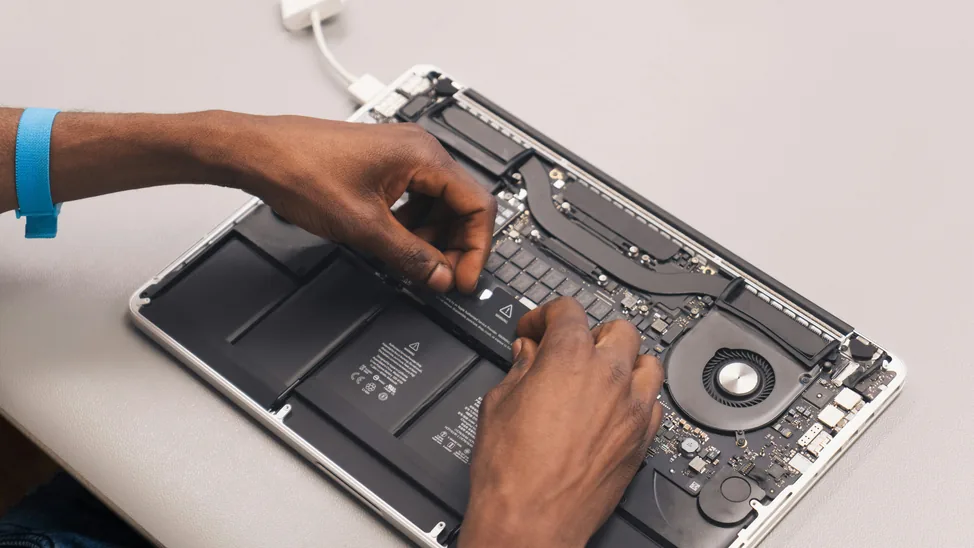
Got a Failed Mac Drive? To find out how you can regain lost data same or next day, call now!
Mac personal computers hardware are like normal Desktop computer and laptops which are specifically designed, developed, manufactured, and marketed by Apple™ Inc. It only uses MAC operating system (OS) designed and developed by Apple Inc. The original Mac hardware used "Motorola" and "IBM" processors, however recently they have launched their new hardware based on Intel x86 processors
Start Your Data Recovery Case
How much will data recovery cost?Submit your details to get a free data recovery quote, Free Consultation or Free Shipping Label.
Mac drive not mounting, showing a flashing folder, or making unusual sounds?
Whether it's a MacBook, iMac, or Mac Pro affected by HFS+/APFS corruption, a failed Time Machine restore, or a physical hard drive fault, continued use can overwrite recoverable data. Power the device down now and let our Mac data recovery specialists assess it free of charge.
Macintosh Data Recovery
The Mac OS was originally known as "System Software", just like Microsoft windows MAC OS comes in different versions. The current version of Mac OS is Mac OS X which has been code named like puma, jaguar, panther, tiger and leopard.
It comes in different designs and is optimized for increased entertainment (Music).
Mac OS X uses HFS and HFS+ (Extended and Journaled) file system, like all other platforms Mac users also face data loss and need Mac data recovery. Just like Microsoft windows MAC also suffer logical corruption but often data loss is due to failure of MAC hard disk drive. Other most common causes for data loss which are supported at Disk Doctor Labs are listed below.
Disk Doctors has a decade of MAC OS and MAC platform experience, in-house specially designed tools and techniques and with highly skilled technicians, we can get your data back no matter what the problem or issue is.
Expert tips!!!
- Do not do a format
- Do not create new partition.
- Never try to reinstall the operating system or run any automated restore wizard as it may overwrite your data.
- Switch off the computer immediately when you hear strange sounds from the drive
- Do no do multiple boots
- Do not try to shake the drive as it may cause further damage
- Do not attempt to reconnect the drive with other computers
- Always seek professional help, call Disk Doctors at 0800 043 6611
MacBook Repair Services
Alongside data recovery, we offer full-spectrum MacBook repair — from cracked screens to failed logic boards — carried out by the same experienced technicians. There's a £50 diagnostic fee to assess the fault before any repair work begins.
- Screen repair, replacement or cracked LCD/LED removal
- SSD/HDD upgrade, replacement or removal
- Logic board repair or replacement
- Keyboard and trackpad repair or replacement
- Missing, unresponsive or liquid-damaged key repair
- Power board repair and burned/broken power jack replacement
- Hinge repair
- Overheating diagnosis and fan replacement
- Mac OS reinstall (optional)
- Data backup and transfer (optional)
We repair MacBook Pro (13″, 15″ and 16″, including Retina models), MacBook Air (11″ and 13″), and the 12″ MacBook. Bring your device in or ship it to our London lab for a faster turnaround.
Trusted by Customers Across the UK

Supported Data Loss Situations
- Unable to boot
- Segment Loader Error
- Catalogue file corruption
- Re-initialized volumes
- Formatted or re-formatted HFS, HFS+ volumes
- Natural Disasters
- Human Errors comprising accidental deletion of data
- Lost or Missing volumes
- Unable to mount or execute data
- Clicking Sound of the drive
- Platter contamination and damages
- Corrupt data
- Virus Attacks
Our Data Recovery Process
Our data recovery process is secure, transparent, and designed to minimise downtime. Here's how it works:
Send us your device using the free postage label and our engineers will assess it for free. We'll let you know exactly what's recoverable before you commit.
We create a full, bit-by-bit clone of your storage media to preserve the original. Your data remains untouched while we work on the image copy.
Depending on the fault, we use cleanroom hardware repairs or forensic software tools to extract your data, even from damaged or encrypted media.
You'll receive a file list of everything we can recover. Once approved, we'll return your data on a secure USB drive or via encrypted cloud transfer.
Other Supported Operating Systems
Windows
NTFS, FAT32 & exFAT recovery across every Windows release.
From Windows 11 down to legacy XP and Server builds, we recover deleted, formatted and RAID-failed volumes — including BitLocker-encrypted and dynamic disks.
UNIX / Linux / Solaris
ext2/3/4, XFS, ZFS & UFS recovery on Unix, Linux and Solaris.
Covers standalone servers, NAS appliances and RAID/LVM arrays running Linux, Sun Solaris, IBM AIX, HP-UX, BSD variants and other Unix-based systems.

Novell
Novell NetWare recovery using the NSS file system.
Our engineers work directly with Novell NetWare servers, recovering data from both traditional and NSS volumes after corruption or failed migrations.
DOS & Others
Legacy DOS, FAT16 and other older or discontinued systems.
We also support other legacy and discontinued platforms not listed here — get in touch to check compatibility with your specific system.
Supported Macintosh Models
- Xserve, G5
- PowerBook, G3, G4, Duo
- Power Macintosh
- Power Mac G3, G4, G5
- iMac G4, G5, Core Duo
- Quadra / Centris
- MacBook Pro
- Mac Pro
- Mac mini
- Supported Mac OS: Up to Mac OS X 10.5 and Mac OS X Server